


























Our 3DCart app connects your shop to our dashboard, providing you  with access to our in-app dashboard without having to leave your 3dcart admin.

Follow the 4 easy steps below to install our app.

First Step

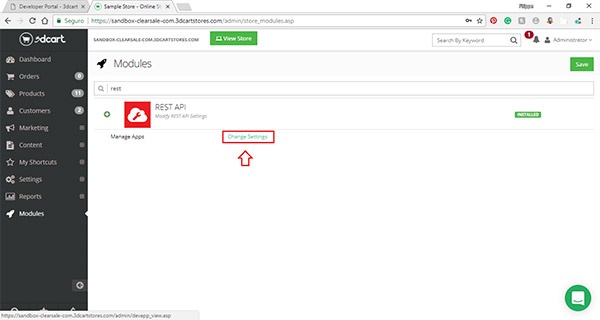
Go to the admin panel, select modules and search for “rest api" and click on "change settings".

3D Cart App Store Preview

Second Step

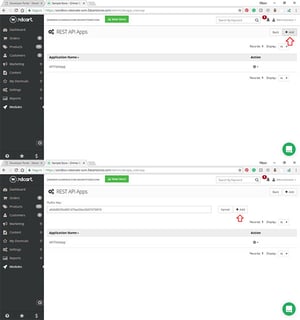
Now click + add:

Set the public key : b8ef71e40900cbb012b18ee253c18b21

And click on +Add

3D Cart App Store Preview

Third Step

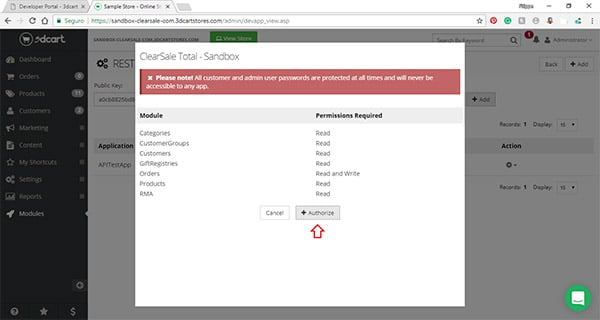
Authorize:

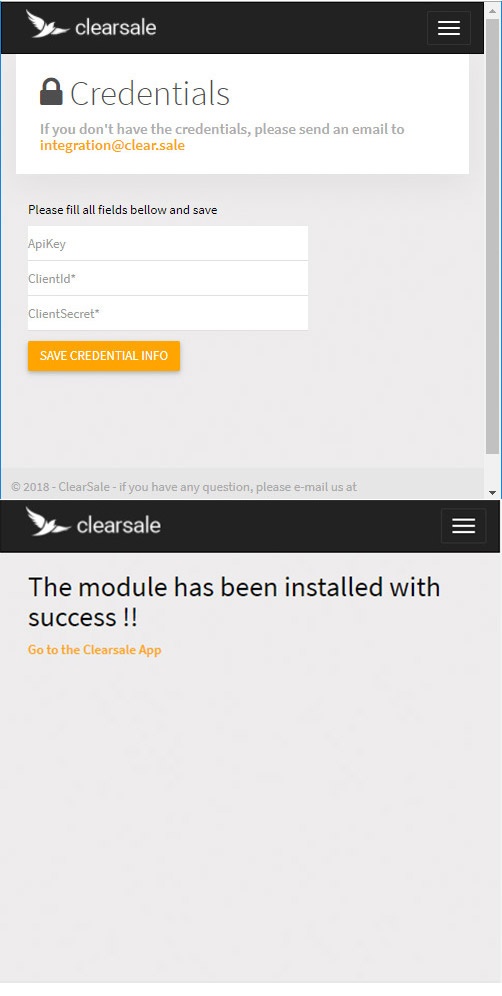
Enter the credentials that our team sent you previously.

3D Cart App Store Preview

Fourth Step

After following these steps, you'll start to see orders populate into your Dashboard.

Now you have access to general info about your orders, conversion rates and Score. You can keep track of all this data within your 3dcart app.

 App Store Preview

ClearSale reviews by G2

ClearSale Has Been Amazing!

5

"Quick fraud detection on all orders. Ease of use on the platform. Never had a chargeback."

They are great!

5

"The competitive rates, their quick response to customer service"

Excellent service - both timeliness and fraud control

5

"I have always received immediate response and minimal fraud rejection -- which leads to increased sales."

Clear Sale gives us confidence that we will get paid

4.5

"Clear sale are very good, the orders get approved quickly ,which is great so we know we can confidently send out the goods. payment confirmation usually happens in 2-3 hrs. once that happens we know we are covered."